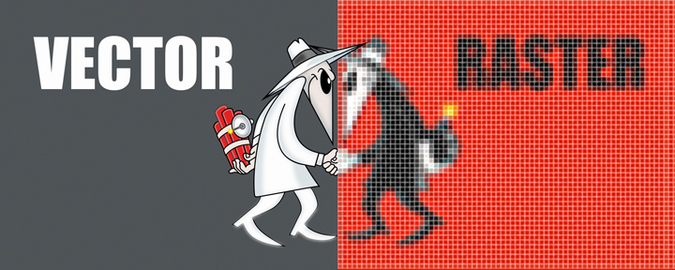
It's NO Competition! Vector and Raster Graphics Have Very Different Purposes.
Vector Art Connects-The-Dots
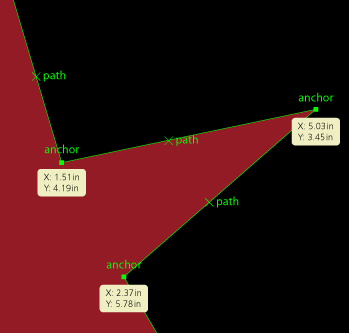 | The word “vector” is a synonym for line. Vector art is created by using mathmatical anchor points to draw lines, curves, geometric shapes and wireframes. Common Uses: Vector graphics are typically used for logos, clip art, tshirts, embroideries, icons, illustrations and screen printing. Formats: Common vector formats include AI, EPS, WMF, CDR, SVG and DXF. Software: There are many different software programs used to create vector based graphics (Adobe Illustrator, Freehand, CorelDRAW, Flash, Inkscape, Fireworks). |
Vector Pros: Small file sizes, fully scaleable without loss of quality, easily converted to a raster object and typically have no background. In a vector object, colors are defined as solid objects and filled with a technique similar to paint by numbers.
Vector Cons: They don't support photographic images well, can be difficult to create because of control limitations, time consuming and can take years to truly master the art form.
Important to Know: When you're using a pen tool you're typically creating a vector graphic. Because a vector object can also be filled with a gradient fill it can make it very difficult to distinguish it from a raster object. With great craftsmanship a photorealistic image can actually be a vector based graphic.
Vector Cons: They don't support photographic images well, can be difficult to create because of control limitations, time consuming and can take years to truly master the art form.
Important to Know: When you're using a pen tool you're typically creating a vector graphic. Because a vector object can also be filled with a gradient fill it can make it very difficult to distinguish it from a raster object. With great craftsmanship a photorealistic image can actually be a vector based graphic.
Raster Art is Made of Square Dots
 | The word "raster" is a synonym for formation. A raster image is a collection of dots called pixels. Each pixel is a tiny square with an assigned color value. The image is created by using a grid of pixels to define the image. Common Uses: Raster graphics are primarily used for photographs, digital paintings, websites, television and monitors. Formats: Common raster formats include BMP, GIF, JPEG, JPG, PNG, PICT, PCX, TIFF, PSD. Software: Microsoft Paint, Adobe Photoshop, Corel Photo-Paint, Corel Paint Shop Pro |
Raster Pros: Excellent handeling of photography, great detail can be applied in a style similar to airbrush or painting. Very smooth working environment with minimum control limitations.
Raster Cons: The quality depends upon the ORIGINAL resolution of the object. Better quality equates larger file size. Not easily scalable as pixels must be estimated when expanded or shrunk. Contain backgrounds unless specific steps are taken to remove the background. Must be recreated by hand to duplicate in a vector format.
Important to Know: When you're using a brush tool you're typically creating a raster graphic. Because a raster object depend upon their resolution image quality is defined at dots per inch (dpi). When scaling an image larger computers must interpulate turning one pixel into several. This is often the result of compression artifacts or "jaggies". Typical desktop laser printers print at 300 dpi while monitors display raster graphics at 72 dpi. Creation and scans should be originated accordingly.
Raster Cons: The quality depends upon the ORIGINAL resolution of the object. Better quality equates larger file size. Not easily scalable as pixels must be estimated when expanded or shrunk. Contain backgrounds unless specific steps are taken to remove the background. Must be recreated by hand to duplicate in a vector format.
Important to Know: When you're using a brush tool you're typically creating a raster graphic. Because a raster object depend upon their resolution image quality is defined at dots per inch (dpi). When scaling an image larger computers must interpulate turning one pixel into several. This is often the result of compression artifacts or "jaggies". Typical desktop laser printers print at 300 dpi while monitors display raster graphics at 72 dpi. Creation and scans should be originated accordingly.


 RSS Feed